
Analyze your competitors’ online ads in just a few clicks
To stand out in your field, analyzing the market and the competition is essential. By keeping a close eye on your competitors’ online ads, you’ll get a better idea of their…

To stand out in your field, analyzing the market and the competition is essential. By keeping a close eye on your competitors’ online ads, you’ll get a better idea of their strengths and weaknesses and, better still, you’ll be able to adapt to market trends.
To get there, you can count on free tools, as simple as they are fast, offered directly by Google, Meta, LinkedIn and TikTok. Here’s how it all works!
Monitoring your competitors’ online ads: why bother?
It might be time to put on your detective outfit, because you’re going to need it… Why? To see in detail what the competition is doing with online ads, particularly display. Going about it this way gives you advantages you shouldn’t overlook:
- at a glance, you get a competitive analysis you can set by geographic area: a global view, or one focused on the French overseas territories, such as Martinique, Guadeloupe or French Guiana;
- you can develop your strategy effectively while adapting it to market trends;
- you uncover a wealth of resources that is sure to inspire you.
In other words, analyzing your competitors’ ads lets you:
- refine or adapt your positioning;
- give your visuals and content a new direction;
- draw inspiration from what already exists, or even do much better than the competition.
And the icing on the cake: if you manage to decode competitors’ ads, you’ll already be able to identify their strategy. You still have to go about it the right way…
Google: the Ads Transparency Center
Google is probably the first place you’d look for competitors’ ads. Its Ads Transparency Center, launched in 2023, is free, intuitive and accessible without a Google Ads account. It lets you search for an advertiser and view the ads it has run over a given period on Google services (Search, Display, YouTube, Gmail…), filtering by date or geographic area (source: Google Ads Help).
To access it from a search, just follow these four steps:
- Go to Google.
- Type a keyword or the name of a competitor related to your search.
- Click the three small dots next to the sponsored ad.
- Choose the option that shows the advertiser’s other ads: you land on its page in the Transparency Center.
You can also go straight to adstransparency.google.com and type the advertiser’s name into the search bar.
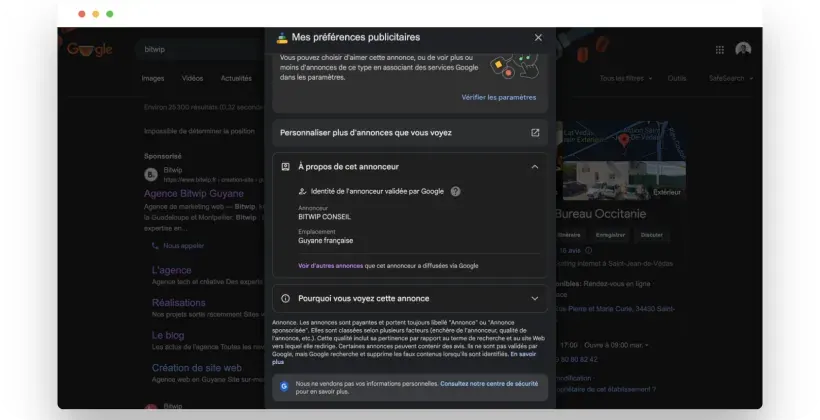
This gives you access to a range of information: the advertiser’s identity and country, the associated ads, and more detailed data depending on the filters applied (country, period, format: text, image or video).
Facebook and Instagram: the Meta Ad Library
To run their ads, your competitors most likely have Facebook and Instagram accounts. Since both platforms belong to Meta, its Ad Library will be a great help. Here it is in four steps:
- Go to the Meta Ad Library.
- Choose a country.
- Under “Ad category,” select “All ads.”
- Enter a keyword or the name of a competitor’s Facebook page.
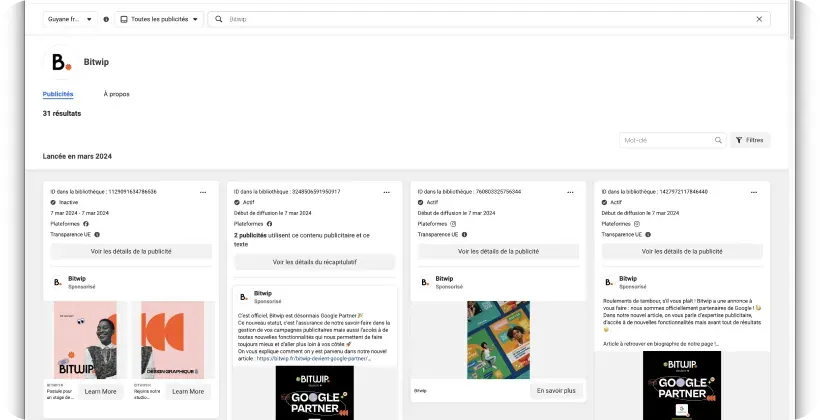
Once you’ve selected the result you’re interested in, you can see the corresponding ads and campaigns. Good news for French advertisers (including those in Martinique, Guadeloupe and French Guiana, which are part of the European Union): ads run in the EU remain viewable one year after they last ran, not just while they are active. Ads about social issues, elections or politics are kept for seven years (source: Meta).
LinkedIn: the Ad Library, a tool not to overlook
On LinkedIn too, finding competitors’ ads has become much easier, even if your competitors are based in Overseas France. There are two ways to go about it:
- The Ad Library: go to linkedin.com/ad-library and search by advertiser name, keyword, country or period.
- The company page: enter the competitor’s name in LinkedIn’s search bar, open its page, then go to the posts tab and its ads filter.
Ads run since June 1st, 2023 remain visible there one year after they last ran, with more details (impressions, targeting, dates) for those run in the European Union (source: LinkedIn Help).
TikTok and other social networks
Beyond Google, Facebook, Instagram and LinkedIn, you can also look up competitors’ ads on other social networks. TikTok in particular offers two tools:
- the Commercial Content Library, which lists ads run in the European Economic Area, Switzerland and the United Kingdom, kept for one year after they were last shown (source: TikTok);
- Top Ads in the Creative Center, a showcase of the best-performing ads, designed for inspiration.
Feel free to play with the filters to narrow things down by geographic area, industry, campaign objective, number of likes or how long the ad has run. The information you gather will be all the richer and more actionable.
How do you get the most out of this competitive analysis?
There you have it! You now have all the data you need on your competitors’ digital marketing strategy: time to put it to use. To make your analysis even sharper, examine these elements:
- the target market;
- the visual style;
- the format used (photo, video, carousel…);
- the message being pushed and the call to action;
- the characteristics of the ad copy (length, tone…);
- the run date, geographic area (Guadeloupe, French Guiana, Martinique…) and the reactions received.
Decoding your competitors’ ads means reading their strategy like an open book.
If you want to seize new opportunities, in your market as well as in current trends, looking at your competitors’ advertising is the way to go. Simple to put into practice, this approach can help you on many levels, whatever platform you choose. One thing is certain: your marketing strategy and your ad messaging will be better for it.
What’s left is turning those clicks into customers: a good ad deserves a landing page to match, as we explain in our article on landing pages, the secret weapon for conversions in Overseas France. And for an outside perspective on all of your communications, consider our free 360° communications audit.
Frequently asked questions
How can I see a competitor’s Google ads?
Go to Google’s Ads Transparency Center (adstransparency.google.com) and type the advertiser’s name, or click the three dots on a sponsored ad to display its other ads.
Can I see a competitor’s past Facebook ads?
Yes, for ads run in the European Union, including France: they stay in the Meta Ad Library for one year after they last ran. Elsewhere, only active ads are visible, except for ads about political or social issues.
Do these competitor ad analysis tools cost anything?
No. Google’s Ads Transparency Center, the Meta Ad Library, LinkedIn’s Ad Library and TikTok’s tools are free and can be used without an ad account.
To make this analysis a success and reap the rewards, tell us what you’re looking for: one of the agency’s specialists will be happy to help. Contact us.